


SeaWorld
4.33.02K Reviews
App Specs
- Version
- 7.1.63.140594
- Updated On
- License
- Free
- Downloads
- 1,000,000+
- Developer
- SeaWorld Parks & Entertainment Inc.
- Categories
- Travel & Local
- Platform
- Android, iOS
Screenshots
 Analysis by AppCompare
For a day at the park, I care less about having a phone full of entertainment and more about answering practical questions quickly: where am I, what can I do next, and how long might I wait? That is the useful role of the SeaWorld app. It is a free travel companion from SeaWorld Parks & Entertainment Inc., built around park information rather than serving as a general map for every destination.
That focus makes it most valuable when a visit is being planned or is already underway. I would not treat it as a substitute for every travel tool on my phone, but as a park-specific reference it can help turn a loose itinerary into a more manageable day. Its 4.4 average from around 12,000 ratings and more than a million installs suggest that plenty of visitors have found a reason to keep it handy.
What the app is useful for today
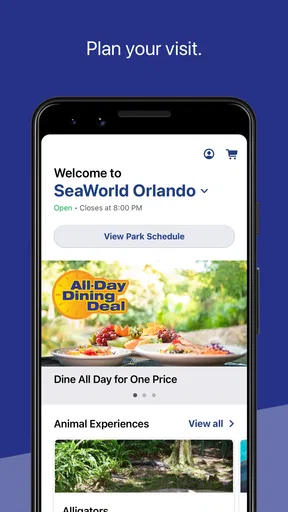
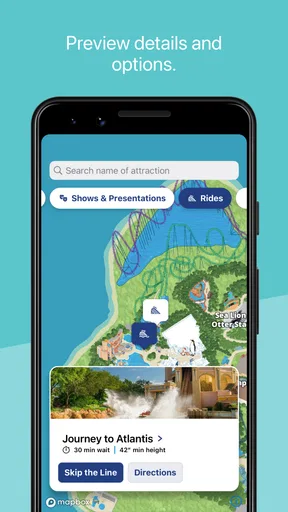
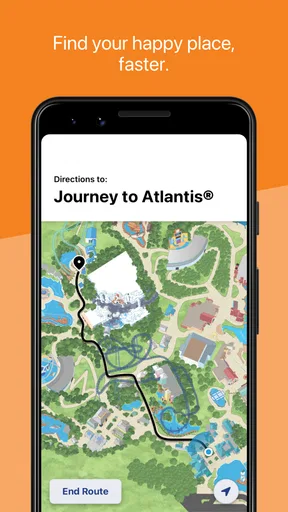
The central appeal is having a park map, wait-time information, and park hours in one place. Those details answer different questions at different stages: hours help you decide when to arrive, the map helps you orient yourself once inside, and wait times can influence what you do next. I find that combination more practical than opening a general mapping app and then searching separately for attraction information.
It is still a focused tool, not a full trip planner. A broad travel app is better for comparing routes, finding places to stay, or organizing stops beyond the park. This one makes more sense once SeaWorld is the destination and you want park-specific guidance at hand.
A smoother way to plan a park day
Before leaving home, I would check the park hours and use the map to get a feel for the layout. That small bit of preparation can help a group agree on a first destination instead of spending the opening part of the visit deciding where to go. I would also keep expectations flexible: a map can orient you, but the best route depends on the people you are with, current conditions, and what they most want to see.
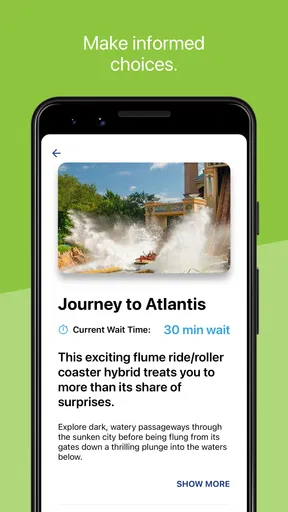
Wait-time information is most useful as a comparison point, not a promise that a particular plan will work perfectly. If one attraction has a long wait, I can consider another nearby option and check again later. A helpful habit is to look at the map before changing direction, so a tempting short wait does not send the group on an unnecessary trek across the park.
Helpful for families and first-time visitors
I can see the app helping families who need to coordinate different interests. One person can check the map while another keeps an eye on hours or waits, then the group can make a decision together. For a first visit, having park information in one place also lowers the chance of relying on memory when everyone is tired, hungry, or eager to move on.
Worth Reading Before You Choose

EA SPORTS FC Mobile 26 Is a Bigger Football Game, but It Takes Time

Flipboard Shows What News Apps Must Do Beyond the Feed

Switching to Android Auto Means Rethinking Your Driving Routine

Google Calendar Makes a Crowded Week Easier to Manage

Ludo King Makes the Most of the Minutes Between Plans

Baby Panda World Brings Quick Play to Modern Phones, but Its Game Library Feels Busy
It is less essential for someone who already knows the park well and prefers to wander without checking a phone. It may also be the wrong fit for visitors seeking a broad marine-life reference or a general-purpose entertainment app; its strongest reason to be installed is the practical connection to a SeaWorld visit. The app is free and rated for Everyone, which makes it easy for a household to consider, though a parent should still decide how much phone use suits their children during a day out.
How it fits beside other travel tools
Compared with a standard map app, a park-specific companion has a narrower job. General maps are familiar and useful for getting to the destination or navigating the surrounding area, while this app is intended to help with information inside the SeaWorld experience. I would use both when needed rather than expecting either one to do everything.
Paper maps and posted signs have a real advantage: they do not ask you to unlock a phone or look at a screen while walking. They are still useful for quick orientation, especially when a group wants to stay present rather than check devices. The app’s advantage is having park details together and being able to consult them as plans change. My practical approach would be to use it at natural pauses, not while moving through a crowded path.
First Impressions
When I first downloaded the app, I wasn’t quite sure what to expect. Was it going to be an interactive guide, a game, or just a simple info hub? Turns out, it’s a delightful mix of everything. Right off the bat, I was greeted with a vibrant splash screen featuring SeaWorld’s iconic orcas and dolphins. It’s like the app itself was giving me a warm welcome, saying, "Hey there, ready to dive in?"
Features to Explore
The app is packed with features that are designed to enhance your SeaWorld experience, whether you’re planning a visit or just exploring from your couch. One of the standout features is the interactive map. It's a lifesaver for those planning a trip to the park. You can easily navigate through different attractions, find dining options, and check out the show schedules. It’s like having a personal guide in your pocket.
But wait, there’s more! The app also includes an array of educational content about marine life. You get to dive deep into fascinating facts about different sea creatures. It’s perfect for kids and adults alike who are keen on learning more about the ocean’s wonders.
Making the information work for you
For a realistic visit, I would treat the map as a decision-making aid rather than a route I must follow from start to finish. A family arriving with different priorities could pick one must-see activity each, then use the map to spot nearby choices between those plans. That keeps the day from becoming a checklist and gives everyone a say without requiring a long discussion at every junction.
There is also a useful trade-off in checking wait times: frequent refreshing can make a visit feel like a race to chase the smallest number. I would check when deciding whether to stay in an area or move on, then put the phone away and enjoy the choice. The information is there to reduce guesswork, not to guarantee an ideal schedule or eliminate every wait.
The Gaming Experience
Now, let’s talk about the game section. Yes, there’s a gaming section! It’s a fun little addition where you can engage in various mini-games themed around marine life. These games are not just a time-killer; they’re quite educational. I found myself getting lost in a game where I had to match sea creatures, and before I knew it, I had learned a bunch about them. Who knew learning could be this entertaining?
User Interface and Experience
The user interface is intuitive and easy to navigate. Everything is laid out in a way that feels natural, so you won’t find yourself lost at sea trying to figure out how things work. Plus, the graphics are top-notch, making the app visually engaging. It’s clear the developers put a lot of thought into crafting an experience that’s both fun and informative.
Keeping You Updated
Another feature worth mentioning is the news and updates section. It keeps you informed about the latest happenings at SeaWorld, from new attractions to special events. If you’re a fan of the park, this is a handy way to stay in the loop. Plus, for those who love a good deal, the app sometimes offers exclusive discounts and promotions. Score!
What returning visitors should know
The app is an evolving product: its current version is 7.1.17.117525, while its release history reaches back to April 14, 2011. Those facts show that it has been around for years and has a current version, but they do not, by themselves, tell me which features changed in each release. I would avoid assuming that a familiar screen or workflow has stayed exactly the same after an update.
If you have used it before, a sensible first step before a new visit is to open it while you have a reliable connection and get reacquainted with its layout. Check the parts you expect to rely on, rather than waiting until your group is choosing its next stop. The minimum operating system is version 9, so compatibility is worth checking on an older device before making the app central to your plans.
Room for Improvement?
Of course, no app is perfect. While SeaWorld offers a fantastic virtual experience, there are a few areas where it could improve. For instance, I noticed that some of the content might take a while to load, especially if you’re not on a super-fast internet connection. It’s a minor hiccup but worth mentioning for those who might get frustrated with loading times.
Additionally, while the app covers a lot, adding more interactive features or augmented reality experiences could take it to the next level. Imagine pointing your phone at a sea creature in the park and getting an AR overlay with fun facts. How cool would that be?
Practical limits to keep in mind
Because some content can take time to load, I would not wait until a busy moment to explore an unfamiliar screen. Looking things over before the visit can make it easier to find what you need when the group is ready to move. A slow connection can also make reliance on an app less comfortable, so posted information and staff guidance remain sensible alternatives if the phone is not cooperating.
It is also worth remembering that a phone-based guide competes with the experience itself. Keeping the app available is useful; checking it constantly is not. I would use the map and wait information at decision points, then give the people and surroundings more attention than the screen. Visitors who dislike using phones during outings may be happier with signs and a simple plan made in advance.
What I would watch in future versions
For returning users, the most meaningful improvements would be the ones that make core park information quick to reach and dependable in ordinary conditions. I would pay attention to whether the map, hours, and wait-time tools remain easy to find after updates, and whether loading feels manageable when a visitor is on the move. Those are more important to a park day than adding novelty for its own sake.
I would also welcome changes that make it easier to use the app briefly and then put the phone away. Clear organization and useful information at the moment of choice matter more to me than extra features that encourage constant browsing. That is an expectation, not a claim about what a future release will include; the current version is the one to judge before planning around any new capability.
Final Thoughts
All in all, the SeaWorld app is a delightful companion for anyone with a love for marine life and theme park adventures. Whether you’re planning a visit or just curious about the ocean’s wonders, this app is worth a download. It’s educational, entertaining, and a little splash of joy in your day.
So, if you’re ready to dive into a world of aquatic excitement, give the SeaWorld app a try. You won’t be disappointed!
Pros
- Engaging marine-themed graphics.
- Diverse range of sea creatures to explore.
- Educational content about ocean life.
- User-friendly interface for easy navigation.
- Regular updates with new features.
Cons
- Requires internet connection to play.
- In-app purchases can be expensive.
- Limited free content available initially.
- May have occasional performance lags.
- Ads can disrupt gameplay experience.
FAQs for SeaWorld
What is SeaWorld, and what can I do in the app?
SeaWorld is an engaging mobile app that brings the wonders of marine life to your fingertips. Users can explore interactive exhibits, learn about various sea creatures, and participate in virtual tours of SeaWorld parks. The app also includes fun games and quizzes to test your marine knowledge.
Is SeaWorld suitable for children?
Yes, SeaWorld is designed to be family-friendly and suitable for children. The app includes educational content that is both fun and informative, making it a great tool for kids interested in learning about marine life. Parental controls and kid-friendly settings ensure a safe and enjoyable experience.
Does SeaWorld require an internet connection to work?
While some features of the SeaWorld app are available offline, such as basic information and certain games, an internet connection is necessary to access the full range of interactive content, live updates, and virtual tours. A stable connection will enhance the overall experience.
Are there any in-app purchases in SeaWorld?
Yes, SeaWorld offers optional in-app purchases. These may include exclusive content, additional games, or virtual items that enhance gameplay. While the app is free to download, these purchases can expand your experience, though they are not necessary to enjoy the core features.
How does SeaWorld handle user privacy and data security?
SeaWorld prioritizes user privacy and data security. The app complies with standard regulations to protect user information. Personal data is only collected as necessary and is used to improve the user experience. Users can review the privacy policy within the app for detailed information.


